The product
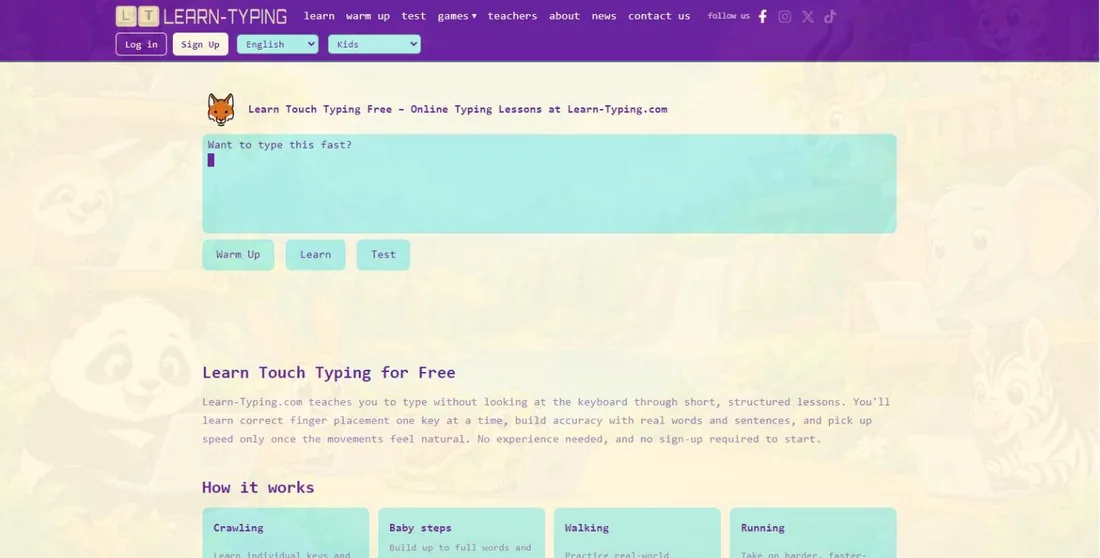
Learn-Typing started in 2025 as a simple idea: make learning to touch type feel approachable, not like a chore. Learners start on the home row and move through the keyboard one step at a time, building accuracy first and speed second, with no sign-up needed.
Teachers quickly began using it with their classes, so the product grew with them: first a free classroom to follow every student, then a full school platform with whole-school accounts, messaging between teachers and students, detailed analytics and designed PDF reports, sold as a yearly subscription with online payments through Stripe.
We designed, built and run Learn-Typing ourselves, and we keep shipping to it. It is the clearest example of how we work on any product: listen to the people using it, ship in small steps, and look after it for the long term.
What we built
Structured lessons
Four stages, from single keys to full passages, and a Capitals course for the Shift key. More than 600 lessons in all.
Guide hands for every key
An illustrated hand pose for each key shows exactly which finger to use, including Shift combinations.
Tests, warm-ups and games
A full typing test with a shareable report, quick warm-ups, and two typing games: Sprint and Space Mission.
Free classroom
Teachers create classes, share a join code, make logins for students without email and follow everyone’s progress.
School platform
A dashboard for the whole school: staff with admin and teacher roles, classes, student accounts with spreadsheet import, and school-wide reports.
Messaging
Teachers and students message each other inside the platform, and students can reach support, with school administrators able to see every conversation.
PDF reports
Designed PDF reports for each student, class and school, plus typing test results, ready to print or share with parents.
Safe sign-in
Students sign in with a username and password from their school, with no email needed, and automated sign-ins are blocked.
Online payments
Schools choose a plan and pay once a year by card through Stripe, or by invoice, straight from their dashboard.
Finger training
Forty lessons for each finger in every language, starting with the finger each student finds hardest.
Typing stories
Illustrated stories students type page by page, reading as they go, from Sinbad to Terry Fox.
Made for every learner
18 colour themes and a kids mode, with no ads for signed-in students and teachers.
The interesting problems
Eleven languages, eleven keyboards
Every language has its own layout and its own rules: the full Arabic keyboard written right to left, the Spanish ñ, French AZERTY and the Canadian layouts. Each key needs the right hand pose, including Arabic letters that need Shift, where the guide shows the pinky holding Shift while another finger types.
Learning from every keystroke
Learn-Typing analyses how each student types, not only their final score. It works out which finger is least accurate and suggests where finger training should start, draws a keyboard heatmap of mistakes, and marks every mistyped word on the speed chart.
A school platform, not just a website
The same product serves a learner on their own, a teacher with one class and a school with a thousand students. Schools have administrators and teachers, classes and student accounts, spreadsheet import, archiving, and free pilots that only start counting when the first student types. A deleted school can be restored for 30 days.
Authentication and security
Sign-in and the database run on Supabase. Students sign in with a username and password the school creates, so no student needs an email address. Passwords are stored only as secure hashes, all traffic is encrypted, and Cloudflare Turnstile and IP checks stop automated sign-ins. Database rules let each school, teacher and student see only their own records, and every staff access to a student profile is logged.
Payments with Stripe
Schools pick a yearly plan in their dashboard and pay by card through Stripe, or by invoice. A pilot can be upgraded at a discount, and when a pilot ends nothing is deleted. Stripe only ever handles the school’s payment, never student information.
Messaging across the platform
Teachers and students can message each other, and students can write to support, all inside the platform. School administrators can see every conversation between their teachers and students, and messages can be reported. Students never receive emails; notification emails go only to teachers and administrators, through Resend.
Reports in PDF
Teachers and school admins get reports for any range of dates and a list of students who need attention. Every report, and every typing test result, can be downloaded as a designed PDF with its charts, ready to print or share with parents, with CSV export and charts that export as images.
Student privacy built in
No ads, no tracking cookies, and student data is never sold, shared for advertising or used to train AI models. School Edition is built for FERPA and COPPA in the United States, supports state student-privacy laws, and schools can sign a data privacy agreement.
Shipped step by step
- 01
Launch
Touch-typing lessons in English, from the home row up, free and with no sign-up.
- 02
11 languages
Indonesian, Filipino, Dutch, Swahili and Malay joined Spanish, Arabic, French, German and Italian.
- 03
Classrooms and reports
Teacher classrooms, a full typing test with a shareable report, and PDF and chart exports.
- 04
Games and guidance
The Space Mission game, a redrawn hand for every key and a Capitals course for the Shift key.
- 05
School Edition
Whole-school accounts, finger analytics, finger training, typing stories and designed PDF reports.
What it means for your product
Secure sign-in, organisations with roles, Stripe subscriptions, in-app messaging, PDF reporting, analytics and a product that works in many languages: Learn-Typing is the experience we bring to every SaaS, desktop and mobile product we build with our partners.
Have a product like this in mind?
Tell us what you want to build and who it is for. We’ll reply with honest advice, a clear plan and a quote.